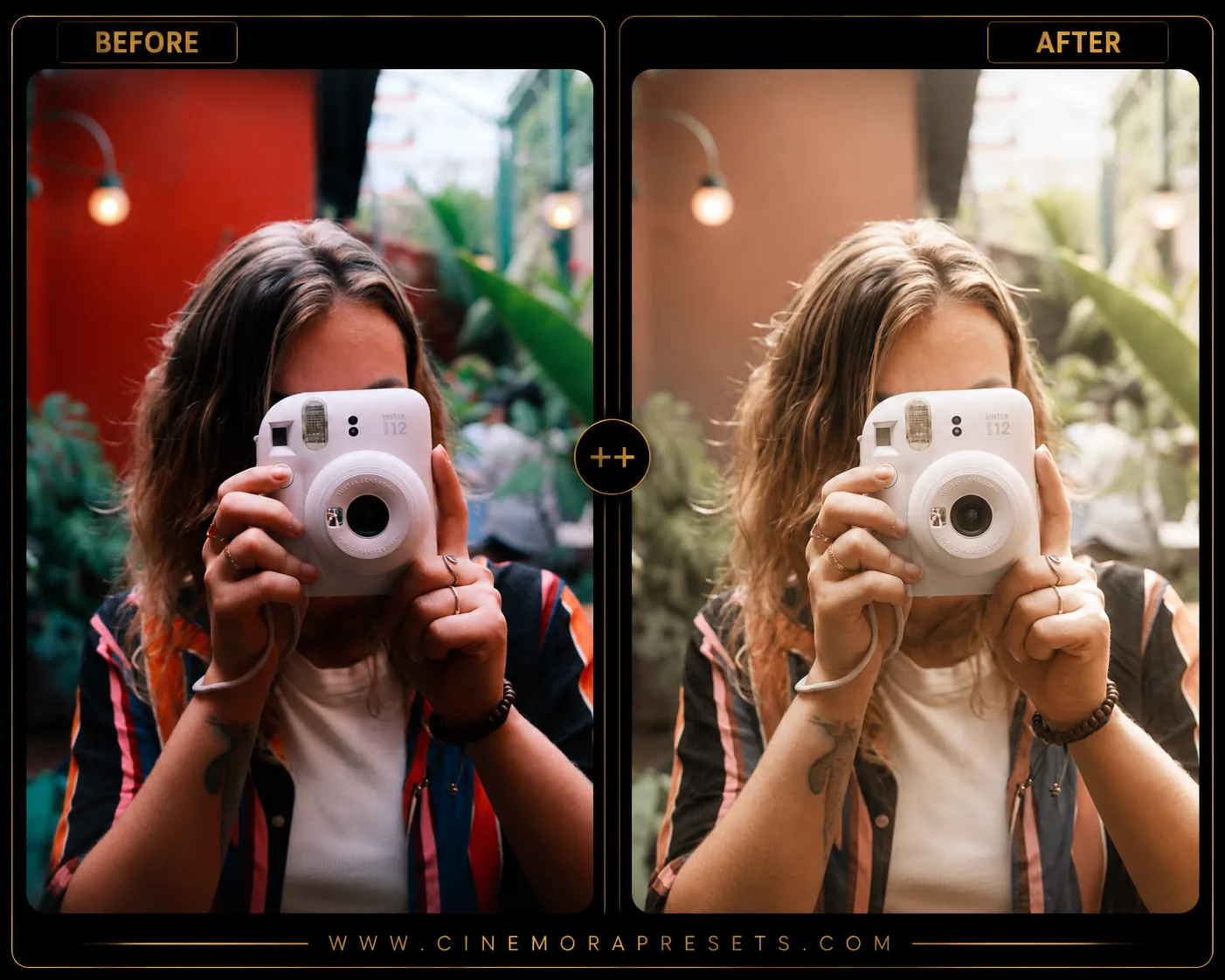
Disposable cameras have made a huge comeback. Their imperfect flash, visible grain, soft colors, and nostalgic film look create a style that feels authentic in a world full of overly polished digital photos. I created this preset pack to recreate that classic disposable camera aesthetic inside Lightroom Mobile and Desktop without needing to buy film or pay for processing. If you love the look of old Kodak FunSaver and Fujifilm QuickSnap photos, these presets are a great starting point.
Recreating the Disposable Camera Look
Disposable film photography has a charm that modern smartphones and digital cameras can't quite replicate. The built-in flash, the strong grain, and the warm, slightly saturated colors make every image feel like a spontaneous memory rather than a planned photoshoot.
Here is how you can recreate and fine-tune that classic disposable camera aesthetic in Lightroom:
Classic Disposable Camera Preset Settings & Slider Values
Temp: +5 | Contrast: +10 | Highlights: -20 | Shadows: +15 | Vignette: -8 | Grain: +35
For more classic film and retro styles, check out our collections of Film presets, Vintage presets, and Grain presets.
1. Hard Flash & High Contrast
Disposable cameras are famous for their cheap, built-in flash, which has a very short range. This creates bright subjects in the foreground and dark, rapidly falling off backgrounds. To mimic this point-and-shoot look, try using a slightly higher Contrast and lowering your Highlights to control any harsh reflections, while keeping shadows relatively open to keep background detail.
2. High-Density Film Grain
The cheap plastic lens and low-grade film stock in disposable cameras introduce a heavy, visible grain. In the Effects panel in Lightroom, increase the Grain amount to around +35. For an even more authentic look, raise the Size and Roughness slightly to make the grain appear organic and gritty, like real 35mm film.
3. Warm, Faded Tones
Disposable prints usually have a signature warm tint. Shift the Temperature slider up slightly (+5) to add an overall golden warmth to the photo. You can also fade the shadows by lifting the left end of the Tone Curve, giving your images that characteristic low-contrast matte look of retro photo prints.
How to Style Disposable Camera Edits
This aesthetic works best on images that feel casual and unposed. In my experience, the less perfect the scene, the better the final edit will look.
Here are a few tips to get the most out of these presets:
- Embrace Candid Moments: These presets look incredible on travel photos, friend groups, beach trips, and nightlife shots.
- Use Direct Lighting: If your photo has a strong light source (like direct sunlight or a phone flash), the colors and grain will mimic a real point-and-shoot camera even better.
- Avoid Heavy Retouching: The beauty of a disposable camera is its raw, authentic feel. Keep the edits simple and let the imperfections speak for themselves.
Installation Guide
Setting up these presets on your phone or computer is very simple:
- Download the ZIP file containing the XMP preset files.
- If you need step-by-step instructions for your specific device, follow my guide on how to install Lightroom presets for instant setup help.
What's Included
This free preset pack includes multiple XMP presets inspired by classic disposable film cameras and point-and-shoot photography.
- Natural Flash Film (bright flash effect with soft shadows and film grain)
- Warm Party Camera (warm colors inspired by indoor disposable camera photos)
- Vintage Snapshot (slightly faded colors with nostalgic contrast)
- Summer Film Look (soft highlights and vibrant outdoor tones)
- Grainy Night Flash (inspired by disposable camera nightlife photography)
Preset Style
These presets focus on the imperfections that make disposable cameras special. Colors are slightly warm, highlights bloom softly, shadows stay visible, and film grain adds texture throughout the image. The result feels casual, nostalgic, and naturally imperfect rather than heavily edited.
Best Photos for This Preset
Disposable camera presets work especially well on parties, vacations, friend groups, travel photography, concerts, beach trips, nightlife shots, and candid portraits. Images with flash or direct lighting often produce the most authentic results.
After downloading, extract the ZIP file and import the XMP presets into Lightroom.
Frequently Asked Questions
Why don't my photos look exactly like a real disposable camera?
Disposable cameras capture light differently than modern smartphones and digital cameras. These presets recreate the color grading, grain, contrast, and flash aesthetic, but the final result still depends on the lighting and original image.
Do these presets work on Lightroom Mobile?
Yes. All presets are provided in XMP format and work with Lightroom Mobile, Lightroom Classic, and Lightroom Desktop.
Should I add extra grain?
In most cases the included grain settings are enough. However, if you want an even stronger film look, increasing grain slightly can help recreate the texture of disposable film.